Edit a policy
Last reviewed: 2026-05-24
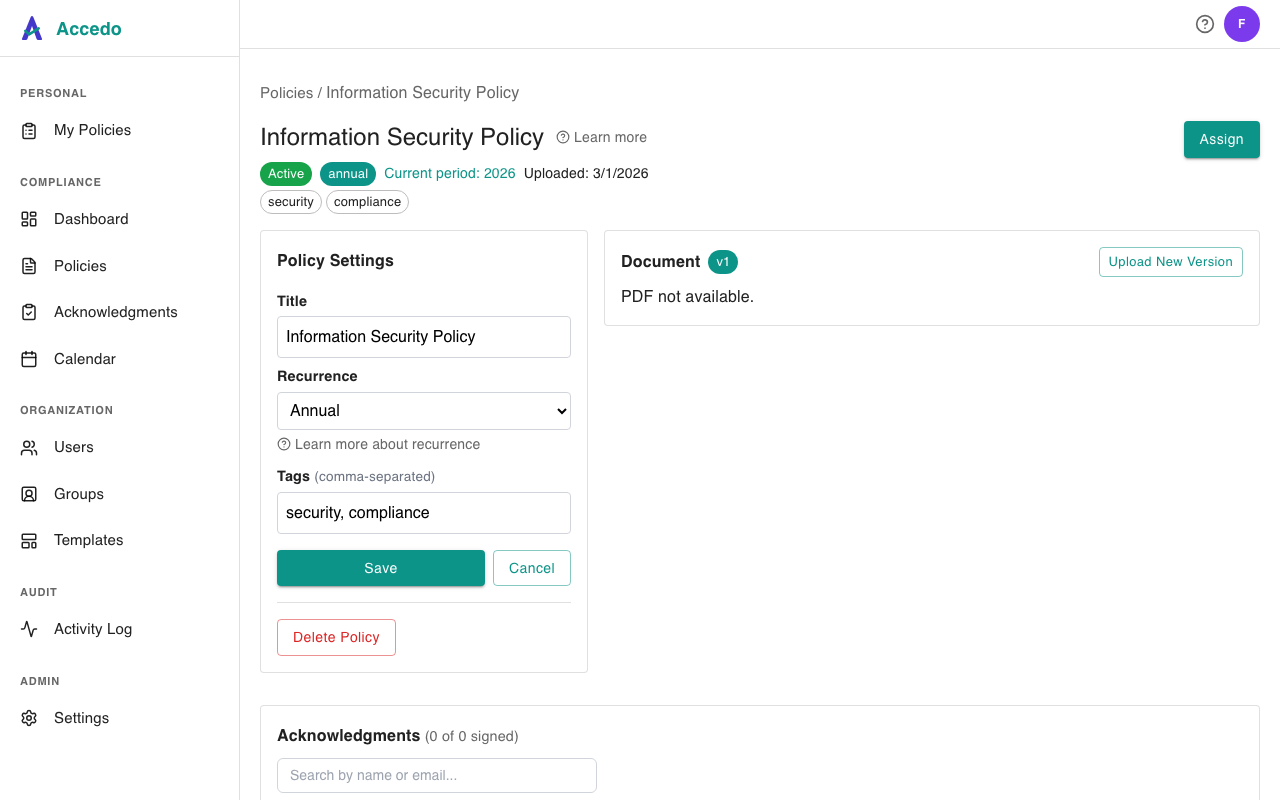
You can update an existing policy at any time. Editing is an admin-only action — open the policy from the Policies list and use the Policy Settings panel on the detail page to change its details. Changes save the moment you click Save; there is no separate publishing step.
What you can change
- Title — the name your team sees in lists, emails, and the signer portal. Keep it short and descriptive.
- Recurrence — set or change how often signers need to re-acknowledge (annual, semi-annual, quarterly, or none). See Recurring acknowledgments for how each schedule behaves.
- Tags — comma-separated labels that drive filtering on the Policies page. Tags are normalized to lowercase.
To replace the underlying PDF, use Upload New Version instead — that is a separate flow with its own versioning rules, covered in Policies overview.
What happens to existing assignments
Editing the title, tags, or recurrence does not invalidate any signatures or re-send any emails. Specifically:
- Previously signed acknowledgments stay signed. The audit trail keeps the title and metadata that were in effect at the moment each user signed.
- Pending assignments keep their original due date and magic link. Signers see the new title the next time they open the policy.
- Recurrence changes apply going forward. If you switch a policy from annual to quarterly, the next acknowledgment period is calculated from the new schedule — already-completed periods are unaffected. See Assignments overview for how cycles work.
If you need every signer to acknowledge the change, upload a new PDF version instead — you will be prompted to re-assign previous signers.
Versioning
Versioning is included on Standard and Premium plans. When enabled, every policy carries a version number and a history of uploads with timestamps and optional change notes. Editing the title, tags, or recurrence does not bump the version; only uploading a new PDF does. On the Free plan the version controls are hidden and the document is replaced in place.